Better Launcher (Aerie)
An all-in-one indie game ecosystem uniting the "Never-Ending Next Fest" taste-matched discovery engine, a zero-dependency localhost IPC game SDK, a multi-engine studio workstation (Perforce, BetterSourceControl, Unreal, Godot, Rust/Zig/C++), and an AI studio copilot into a single high-performance desktop app.
Interactive Visual Tour: Inside the Aerie Desktop App
Click through the 7 tabs below to inspect real screenshots of Aerie across both Player Mode and Dev Studio Mode. Click any screenshot to zoom in at full 2160x1350 retina resolution.
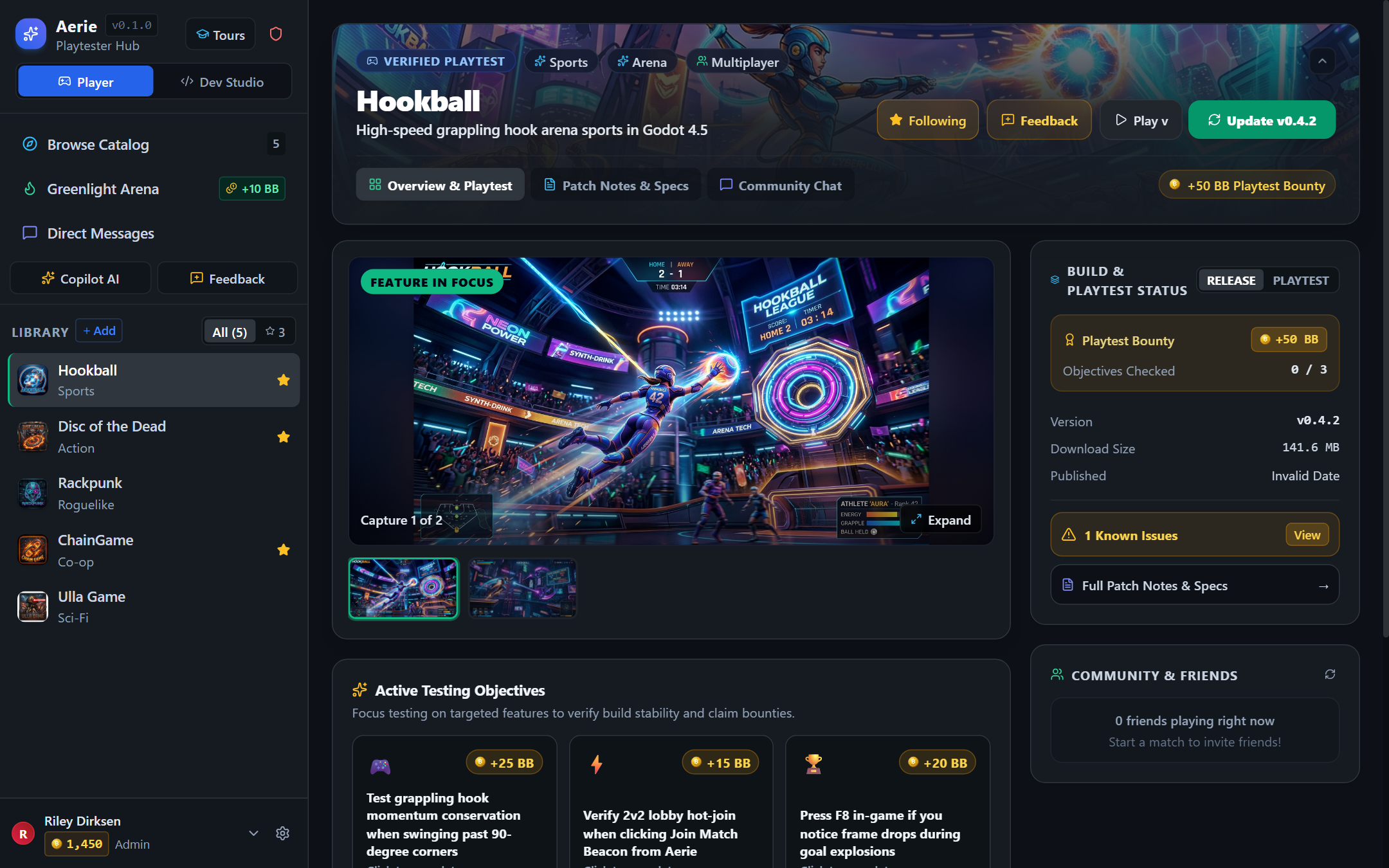
release and playtest build channels, cast verified Would Play / Needs Work votes, broadcast Matchmaking Beacons, and review the developer's Active Testing Objectives and Keybindings (including F8 In-Game Bug Reporter).
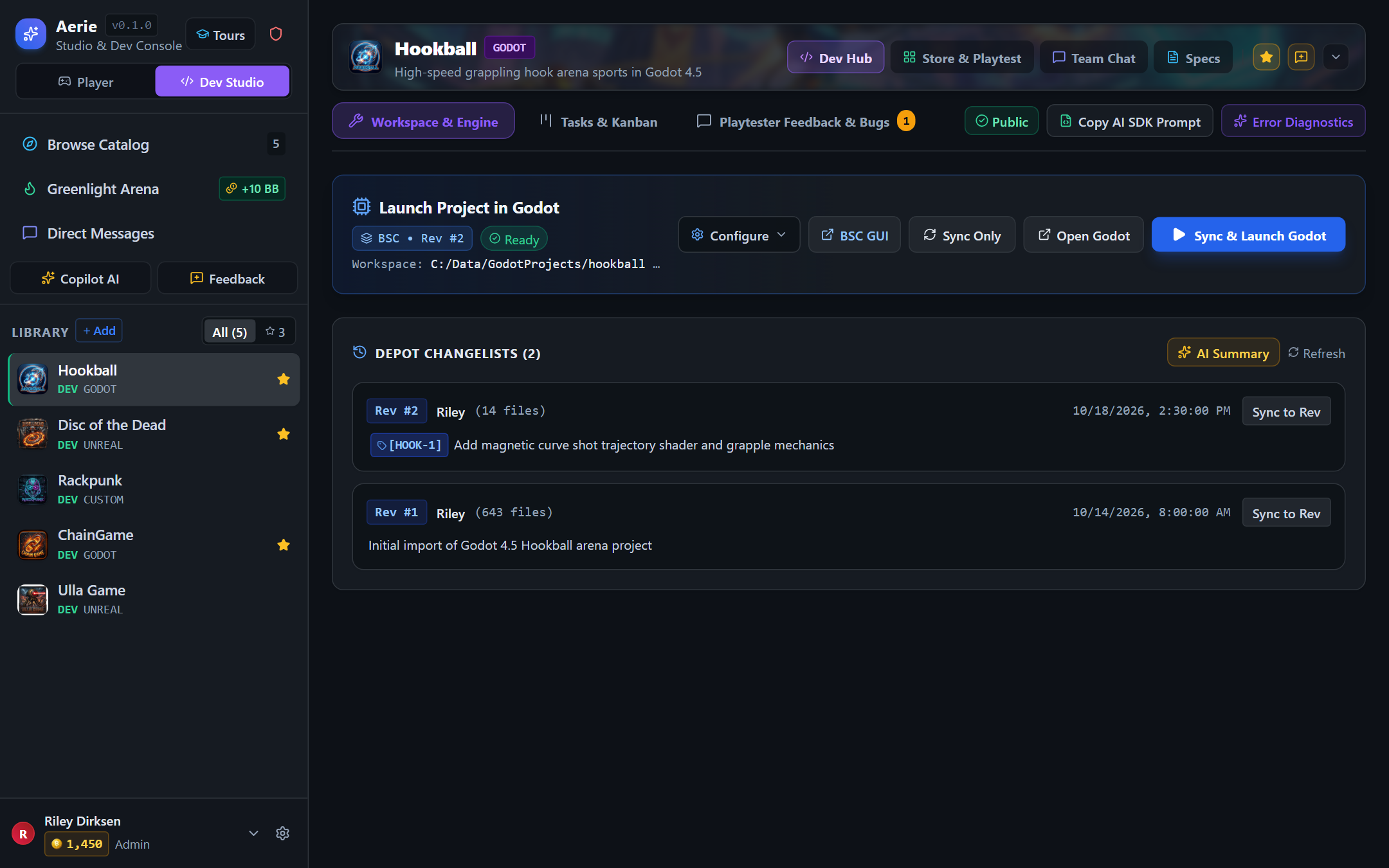
Dev Studio mode replaces the consumer banner with a compact context bar and unlocks 1-click Sync & Launch (Godot, Unreal, or Custom CLI), Copy AI SDK Prompt, Error Diagnostics, and Depot Changelists with clickable ticket badges ([HOOK-1]).
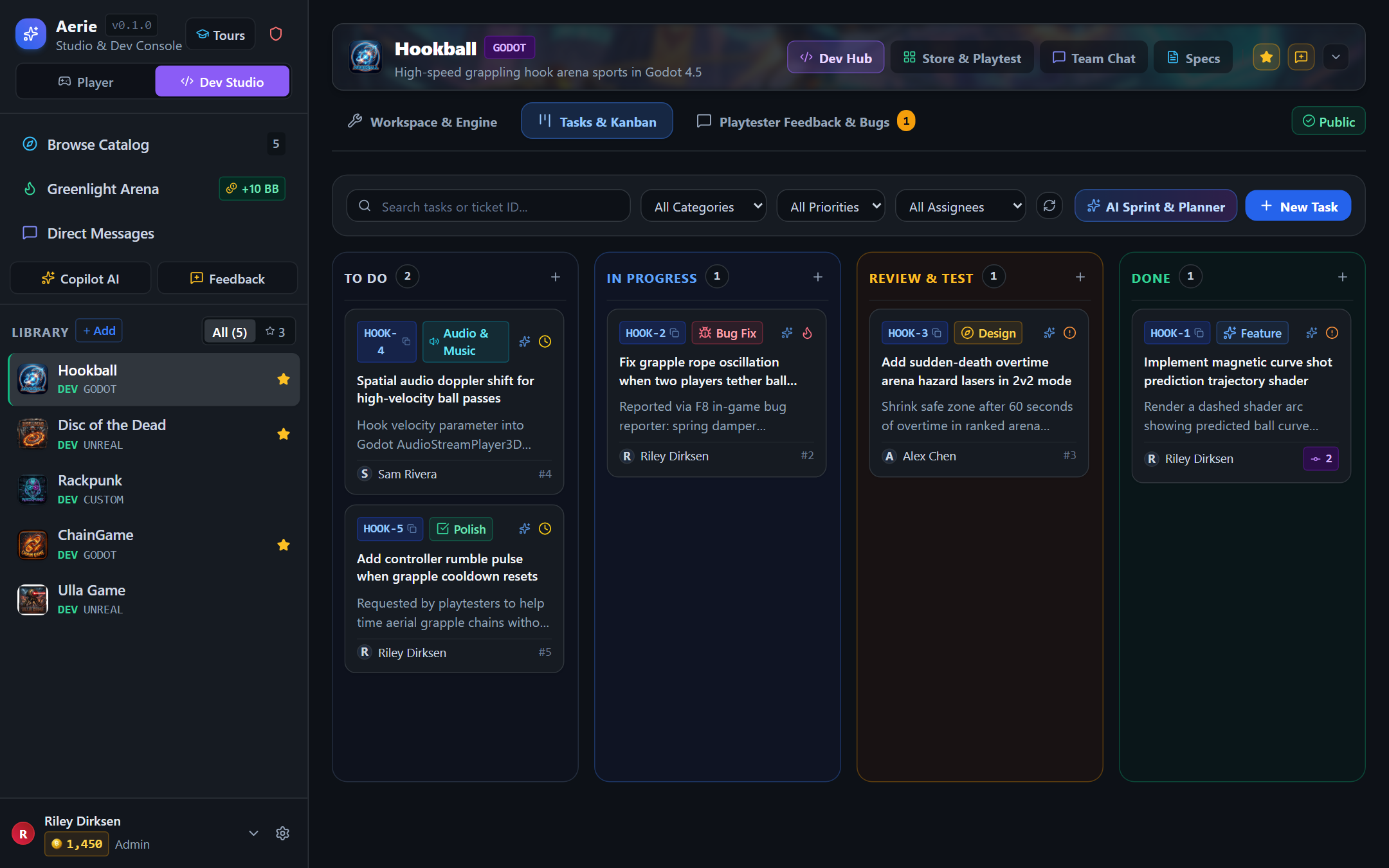
2 commit badge on HOOK-1—mentioning [HOOK-1] in a Perforce or BSC commit automatically links that revision to the card!
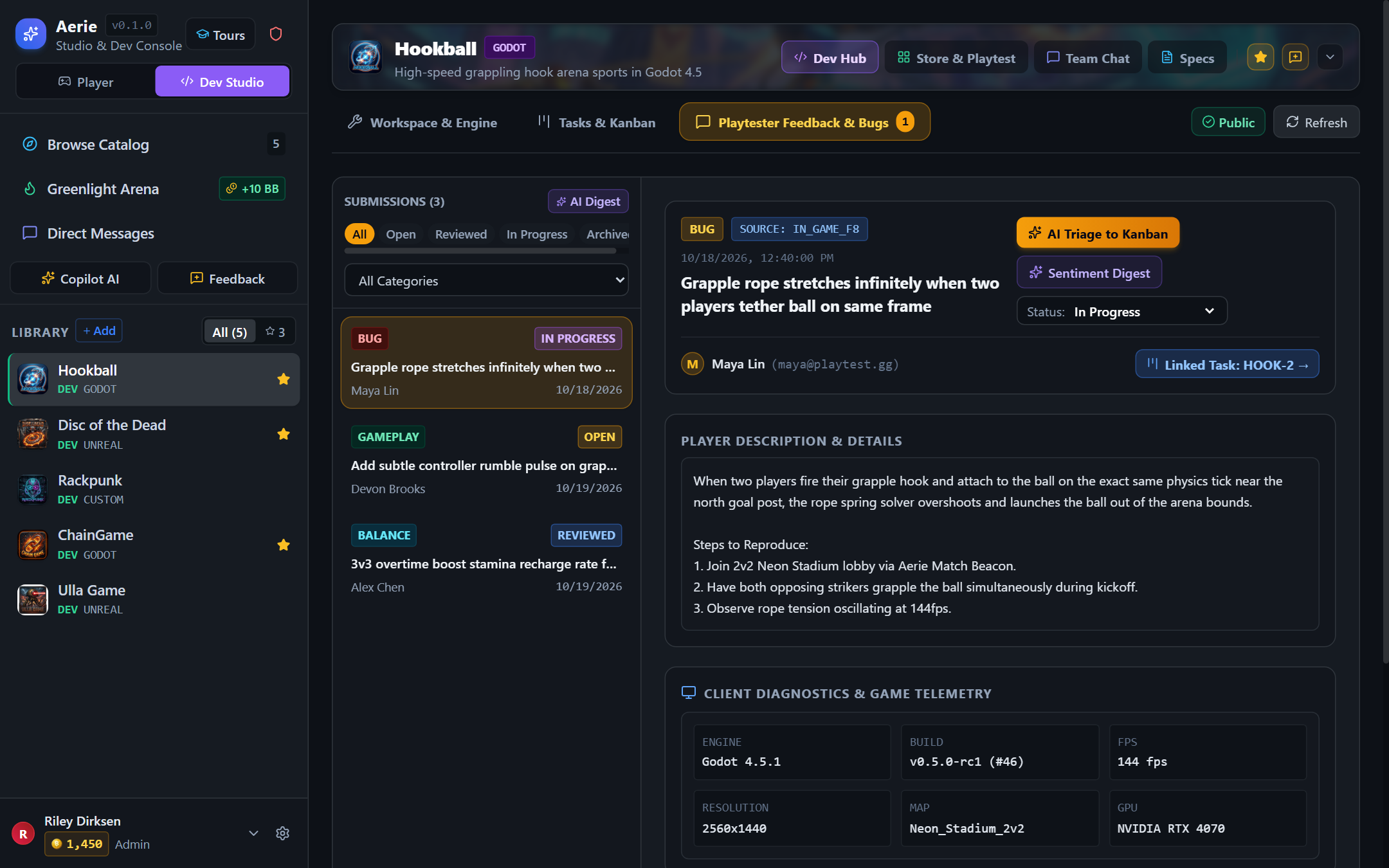
F8 in-game, their report arrives with structured Client Diagnostics & Game Telemetry (Godot 4.5.1, 144 fps, 2560x1440, NVIDIA RTX 4070). Clicking AI Triage to Kanban turns the report into ticket HOOK-2 in one click.
How to Use Aerie: Step-by-Step Practical Guide
Aerie is designed around two distinct workflows—one for Players & Playtesters discovering and testing games, and one for Game Developers & Studios building and shipping games. Here is exactly how to use both:
How to Playtest Games, Join Beacons & Earn Better Bucks
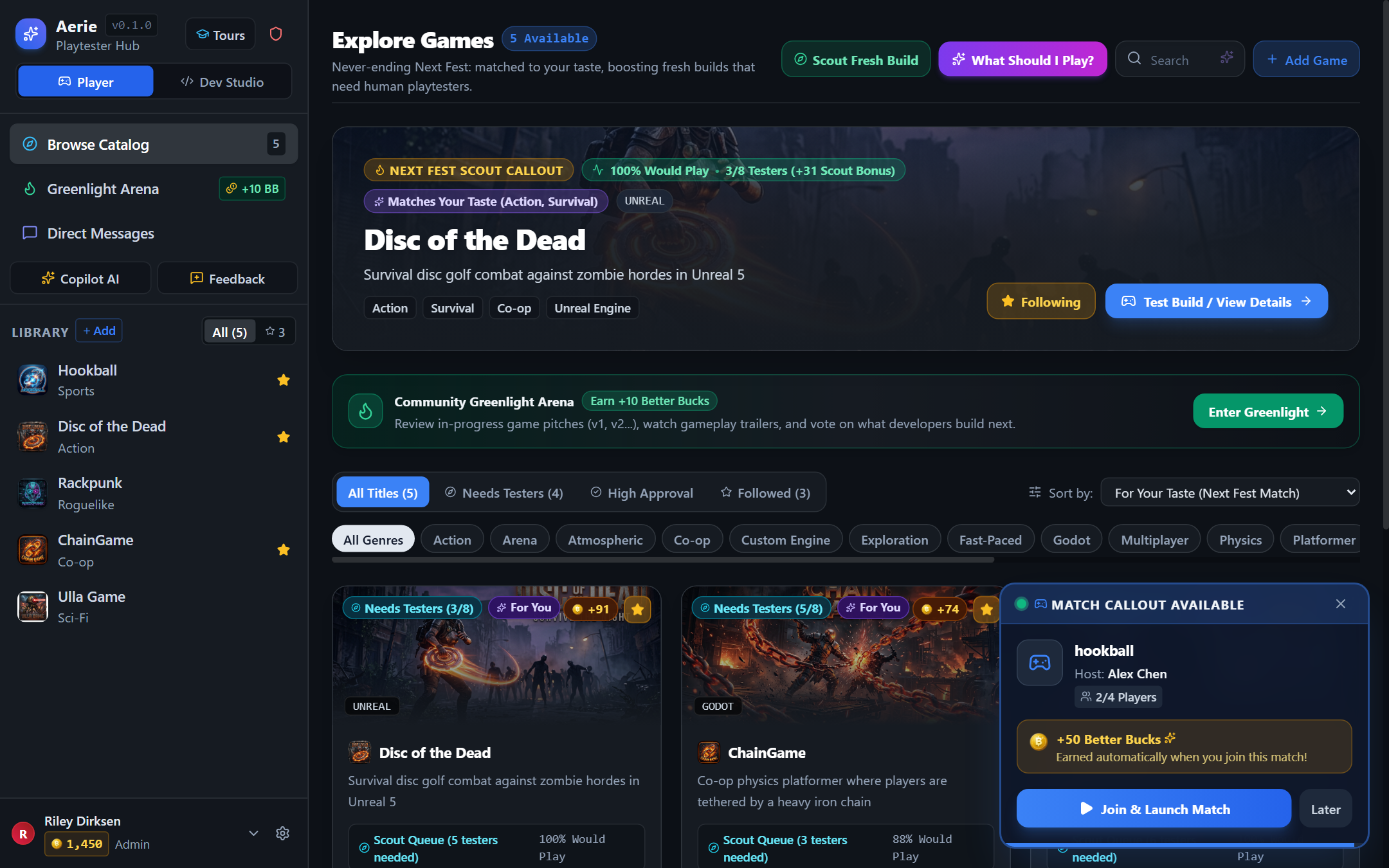
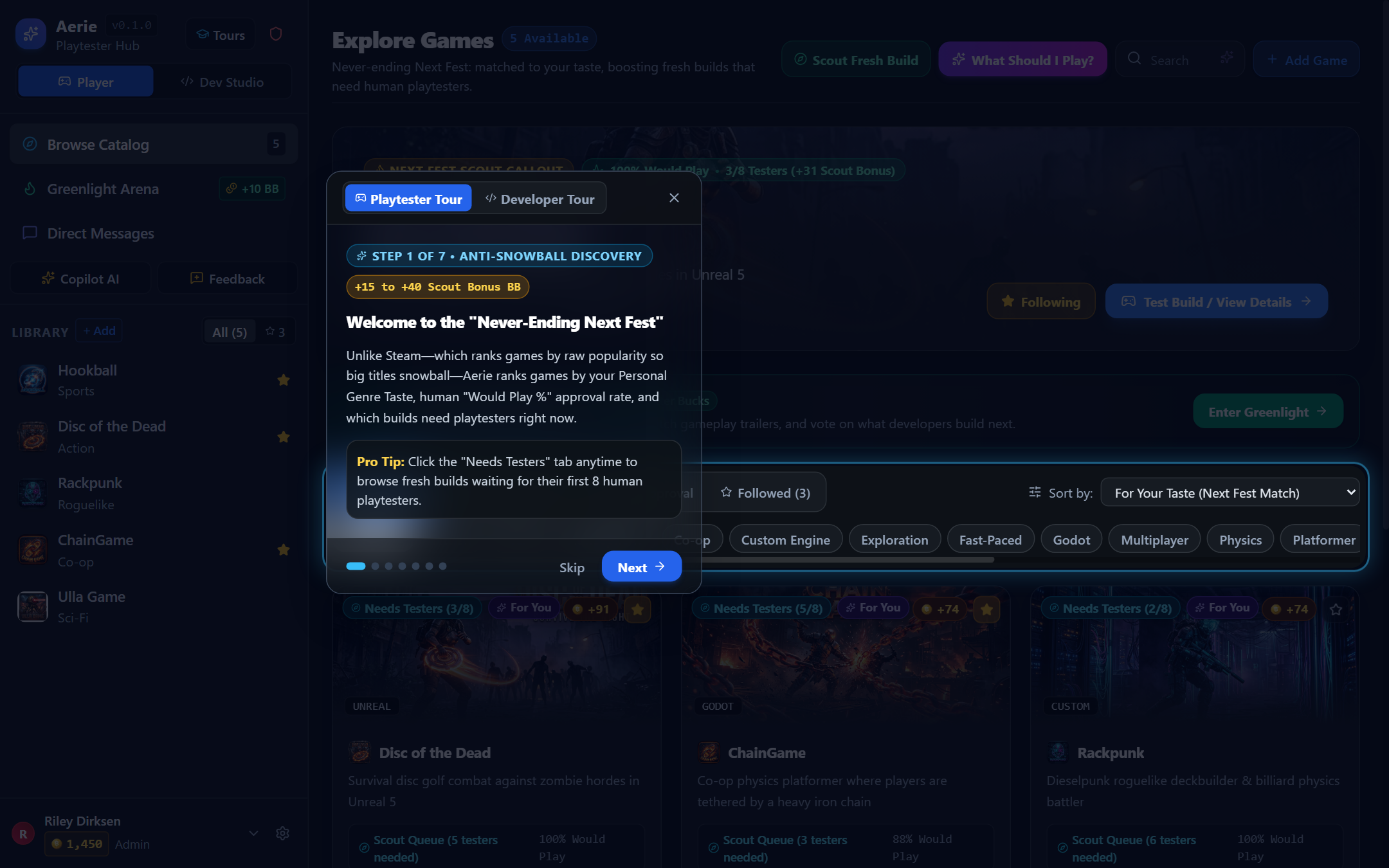
Click Browse Catalog in the left sidebar. By default, games are sorted by For Your Taste (Next Fest Match), which boosts genres you follow and games in the Scout Queue (<8 human testers). Not sure what to play? Click 🎲 Scout Fresh Build to jump straight to an under-tested game, or click ✨ What Should I Play? to tell the AI Concierge your current mood.
→ View Screenshot 01 (Browse Catalog & Scout Queue)
Click any game in the catalog or your sidebar library to open its Store & Playtest Hub. If the developer has published an experimental build, use the channel selector next to the Install / Play button to switch between Release and Playtest. Scroll down to read the developer's Active Testing Objectives, Known Issues, and Keybindings before launching.
Testing a multiplayer game alone is impossible. Whenever another player or developer clicks Broadcast "Need Players", a live Match Callout Available toast pops up in the bottom-right corner of Aerie. Click ▶ Join & Launch Match—Aerie automatically boots the game, connects you directly to their lobby via localhost IPC (127.0.0.1:27088), and credits your +50 Better Bucks bounty.
F8 In-Game to Report Bugs & Cast Your Proof-of-Play Vote
⌨️ F8 Bug Reporter
👍 Would Play / Needs Work
While playing, press F8 (or click Feedback in the launcher sidebar) to send a bug report or balance suggestion. Aerie automatically attaches your build version, GPU, resolution, and FPS so you don't have to type specs manually. After playing for 3+ minutes, click Would Play or Needs Work on the game page to record your verified Proof-of-Play vote.
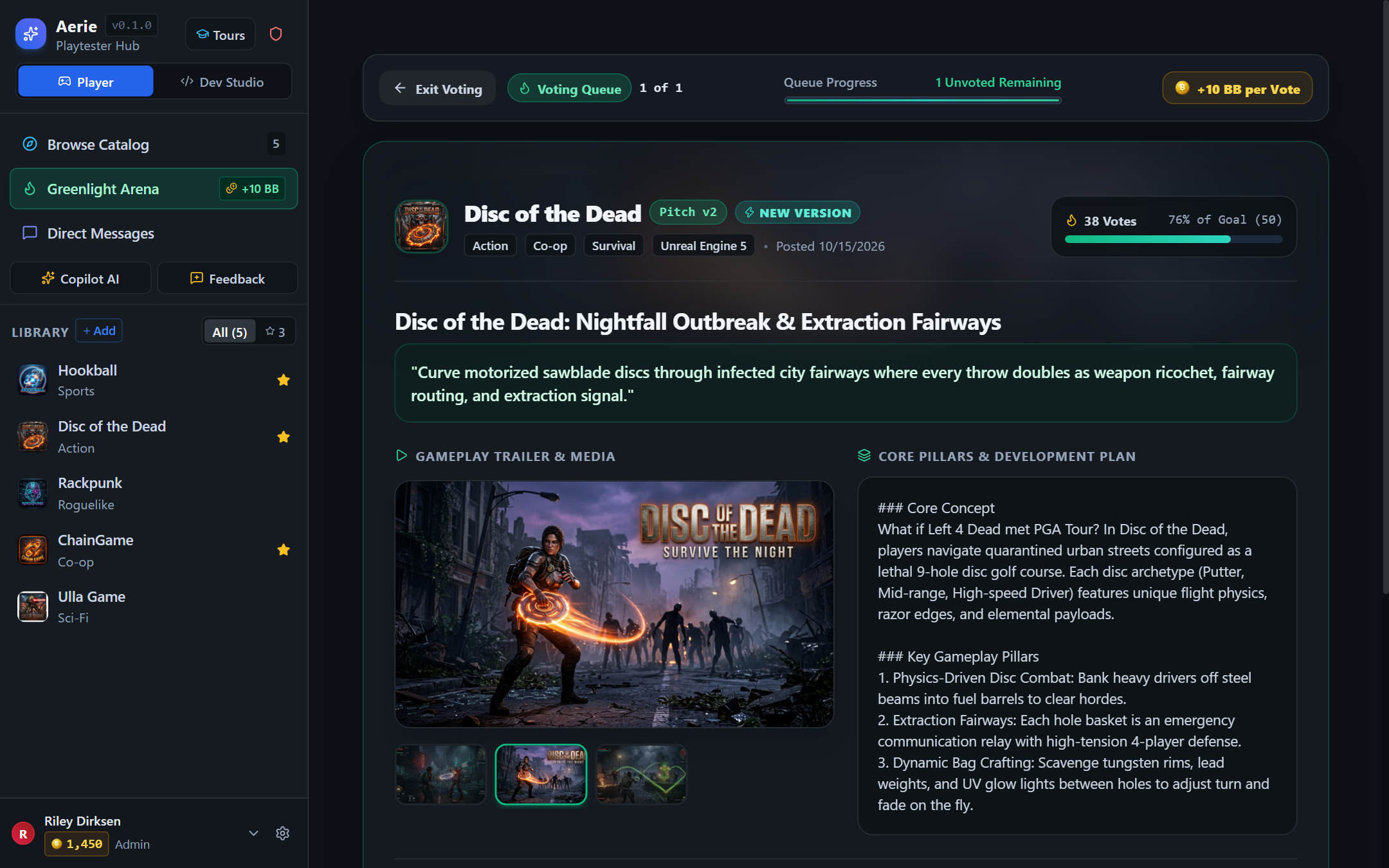
Click Greenlight Arena in the left sidebar to enter the concept voting queue. Browse trailers, concept art, and gameplay pillars for upcoming prototypes, then vote Would Play, Might Play, or Not For Me with optional feedback to earn +10 Better Bucks per pitch.
→ View Screenshot 03 (Greenlight Voting Arena)How to Sync Source Control, Launch Engines, Triage Bugs & Ship Builds
Click </> Dev Studio at the top of the left sidebar and select your project. The big consumer hero banner automatically collapses into a single compact context bar with 4 top-level tabs: Dev Hub, Store & Playtest, Team Chat, and Specs. Click Configure on the action bar to select your source control provider (BetterSourceControl or Perforce Helix Core), local workspace path, and target engine binary (Godot, Unreal Engine, or custom CLI command like cargo run).
Click Sync & Launch Godot / Editor to pull the latest depot revision and boot your engine with Aerie's localhost IPC server active on 127.0.0.1:27088. Need to integrate player identity, multiplayer session advertising, matchmaking beacons, and F8 bug reporting into your game code? Click Copy AI SDK Prompt in the top-right of the Dev Hub and paste it into Claude Code, Cursor, or Antigravity.
Click the Playtester Feedback & Bugs sub-tab to review incoming F8 in-game reports and launcher submissions. Select any report to view its Client Diagnostics & Game Telemetry (engine version, build number, FPS, resolution, map, GPU). Click ✨ AI Triage to Kanban—Aerie Copilot extracts clean reproduction steps, recommends a priority/category, creates the Kanban ticket (e.g., [HOOK-2]), and links it back to the player's report.
Open the Tasks & Kanban sub-tab. Click any ticket badge (such as HOOK-1) to copy [HOOK-1] to your clipboard. When you submit a changelist in BetterSourceControl or Perforce containing [HOOK-1] in the commit description, Aerie automatically links that revision to the Kanban card so anyone on the team can click Sync to Rev directly from the ticket!
Ready to ship a new build to playtesters? Click the Shield (Admin) icon in the header or Title Settings in the Dev Hub, select your game's Packaged Builds tab, and drop your .zip archive into the 25MB Chunked R2 Uploader. New team member or playtester onboarding? Click 🎓 Tours in the top-left header anytime to launch the interactive spotlight tutorial.
1. The Problem: The 10,000-Game/Week AI Flood & The Post-Engine Shift
Video game development and distribution are undergoing two simultaneous structural disruptions:
Steam already sees 15,000+ releases/year. Generative AI tools (Cursor, Claude Code, Antigravity) will soon push this to thousands of playable releases per week. Because Steam ranks games by cumulative volume (gross revenue, total wishlists), the top 1% snowball forever while 99% of innovative indie games never get their first 10 human playtesters.
Indies no longer strictly require 30GB monolithic commercial engines (Unreal/Unity). Developers and AI coding agents build games directly in Rust (Bevy, Macroquad), Zig (Mach), C++ (SDL3, Raylib), WebGPU/Three.js, and Godot. However, leaving commercial engines strips them of identity, lobbies, matchmaking, bug triage, and delta updates.
2. High-Level System Architecture
Aerie utilizes a hybrid local-first desktop core (Tauri v2 + Rust) connected to a zero-cold-start serverless backend on Cloudflare:
┌─────────────────────────────────────────────────────────────────────────────┐
│                       AERIE DESKTOP RUNTIME (Tauri v2)                      │
│                                                                             │
│  ┌─────────────────────────┐  ┌─────────────────┐  ┌─────────────────────┐  │
│  │    React 19 Frontend    │  │ Aerie AI Engine │  │ WebRTC VoiceManager │  │
│  │ (Player & Studio Modes) │  │  (10 Tools/BYOK)│  │ (Calls SFU + Mesh)  │  │
│  └────────────▲────────────┘  └────────▲────────┘  └──────────▲──────────┘  │
│               │                        │                      │             │
│  ┌────────────▼────────────────────────▼──────────────────────▼──────────┐  │
│  │                Rust Native Core (apps/desktop/src-tauri)               │  │
│  │   • Single-Instance Guard      • Streaming Delta Downloader (packages)│  │
│  │   • Perforce CLI Reader (p4)   • BetterSourceControl CLI Driver (bsc) │  │
│  │   • Engine Scanner (Unreal/Godot/Custom) • PE Binary Self-Updater     │  │
│  └─────────────────────────────────────▲─────────────────────────────────┘  │
│                                        │                                    │
│                 ┌──────────────────────▼──────────────────────┐             │
│                 │   Local Loopback HTTP Server (127.0.0.1)    │             │
│                 │              PORT: 27088                    │             │
│                 └──────────────────────▲──────────────────────┘             │
└────────────────────────────────────────┼────────────────────────────────────┘
                                         │
               ┌─────────────────────────┴────────────────────────┐
               │                                                  │
┌──────────────▼────────────────┐              ┌──────────────────▼───────────┐
│     Running Game Process      │              │ Cloudflare Serverless Cloud  │
│   (Godot, Rust, C++, Zig, TS) │              │                              │
│ • GET /api/user (Identity)    │              │ • Worker API (packages/backend)
│ • POST /api/match-beacon      │              │ • D1 SQLite Database         │
│ • POST /api/feedback (F8 Bug) │              │ • R2 Zero-Egress Storage     │
│ • GET /api/session/pending-join              │ • Cloudflare Calls SFU Voice │
└───────────────────────────────┘              └──────────────────────────────┘
Monorepo Layout
| Directory | Role & Stack | Key Files |
|---|---|---|
apps/desktop |
Tauri v2 Windows Desktop Client | App.tsx, Sidebar.tsx, DeveloperHub.tsx, src-tauri/src/lib.rs |
packages/backend |
Cloudflare Worker REST API | src/index.ts, schema.sql, wrangler.toml |
packages/shared |
Shared TypeScript Contracts | src/index.ts (Auth, Apps, Builds, Workspaces) |
docs/godot |
Godot 4 Drop-In Autoload SDK | BetterLauncher.gd (Identity, Sessions, F8 Telemetry) |
scripts/ |
Automated Packaging & R2 Publisher | package-release.js, publish-launcher.js |
3. Personas, RBAC & Adaptive UI
Aerie eliminates visual clutter through Adaptive Progressive Disclosure:
Presents a clean consumer storefront and playtesting hub. Displays the "Never-Ending Next Fest" catalog, verified download channels, matchmaking beacons, Greenlight arena, and in-game F8 feedback. Dev tabs, source control configs, and Kanban boards are fully hidden.
Unlocks the Developer Hub: 1-click Perforce/BetterSourceControl workspace syncing, editor launching (Unreal, Godot, Custom/Code-First), integrated multi-discipline Kanban board with commit linking, playtester feedback triage, and Cloudflare R2 build publishing.
4. The "Never-Ending Next Fest" & Anti-Snowball Discovery
Steam's algorithm uses cumulative volume (gross revenue, total wishlists), which creates an inescapable rich-get-richer snowball where the top 1% monopolize front-page visibility. Aerie replaces this with the Anti-Snowball Proof-of-Play Mathematical Curve:
- Volume Capped at 3 Sessions: Raw play volume is capped at a 3-session verification baseline. Beyond 3 sessions, additional plays add 0 points to discovery rank, making it mathematically impossible for popular titles to drown out new games.
- Rate Over Volume (Would Play %): Games are ranked by their human approval rate (
wouldPlayPercent) rather than total reviews. A game tested by 8 players with 100% approval ranks higher than a game with 1,000 plays and 70% approval. - Scout Queue Boost & Saturation Decay: Builds with under 8 verified human playtest sessions receive a high-priority Scout Queue Urgency Boost and award extra Scout Bonus Better Bucks (+15 to +40 BB) to players who test them. Once a build reaches 8 testers, urgency decays so fresh builds rotate into the spotlight.
Release vs Playtest), Proof-of-Play voting, Matchmaking Callout broadcaster, and structured Active Testing Objectives.
Interactive Proof-of-Play Discovery Simulator
Test how Aerie calculates discovery ranking and rewards playtesters using the live simulator below:
The Better Bucks Virtual Economy
Better Bucks (BB) incentivize human players to playtest early builds, answer matchmaking callout beacons, and file high-quality bug reports:
| Player Action | Default Reward | Verification & Anti-Abuse Mechanism |
|---|---|---|
| Vote on a Greenlight Concept | +10 BB | Recorded per pitch version in greenlight_votes. Players cannot double-farm the same version. |
| Answer a Matchmaking Callout Beacon | +50 BB (or custom bounty) | Claimed via POST /api/beacons/:id/claim when joining an active multiplayer lobby. |
| Scout an Under-Tested Build (<8 plays) | +15 to +40 BB | Automatic Scout Bonus calculated by build urgency. Verification requires 3+ minutes in-game. |
| Helpful Bug / Telemetry Report (F8) | +25 to +100 BB | Awarded by developers directly in the feedback triage panel (rewardFeedback). |
5. Matchmaking Beacons, Local IPC Server & Game SDK
Whenever a game or editor is launched from Aerie, the launcher spawns a zero-dependency local HTTP server on http://127.0.0.1:27088. Any game engine or custom compiled language can communicate with Aerie using standard HTTP requests.
Environment Variables & CLI Injected on Launch
| Environment Variable | CLI Flag | Description |
|---|---|---|
BETTER_LAUNCHER_PORT |
--better-port=27088 |
Local IPC port (default 27088). |
BETTER_LAUNCHER_APP_ID |
--better-app-id=<slug> |
Unique catalog ID of the running game. |
BETTER_LAUNCHER_USER_ID |
--better-user-id=<uuid> |
Authenticated player's UUID. |
BETTER_LAUNCHER_DISPLAY_NAME |
--better-username=<name> |
Authenticated player's display name. |
BETTER_LAUNCHER_JOIN_SESSION |
--better-join-session=<id> |
Present on cold-boot when launching directly into a friend's lobby. |
Local Loopback HTTP API Endpoints (`127.0.0.1:27088`)
| Method & Endpoint | Payload | Purpose |
|---|---|---|
GET /api/user |
None | Returns { ok, id, displayName, email }. Auto-populates in-game player profile. |
POST /api/session |
{ appId, sessionId, currentPlayers, maxPlayers, isJoinable } |
Advertises multiplayer lobby to friends and party members in Aerie. |
DELETE /api/session |
None | Clears active multiplayer session upon exiting to main menu. |
GET /api/session/pending-join |
None | Poll every 2s. If sessionId is present, connects player to that lobby. |
POST /api/match-beacon |
{ appId, message, sessionId, currentPlayers, maxPlayers } |
Broadcasts "Need Players" alert with Better Bucks bounty to all Aerie users. |
POST /api/match-joined |
{ appId, sessionId } |
Awards matching Better Bucks bounty to joiner upon connection. |
POST /api/feedback |
{ appId, category, title, content, metadata } |
Proxies in-game F8 bug reports directly to dev triage with user JWT & telemetry. |
6. Universal AI-Native SDK Specification
Whether building with Godot, Unreal, Rust (Bevy), Zig (Mach), C++ (SDL3/Raylib), or WebGPU, integrating Aerie takes under 30 seconds.
You are integrating our game with the Aerie (Better Launcher) desktop runtime.
Aerie runs a zero-dependency local HTTP loopback server on `http://127.0.0.1:27088` (or environment variable `BETTER_LAUNCHER_PORT`) whenever the game or editor is running.

### Environment Variables & CLI Flags Injected by Aerie on Launch:
- `BETTER_LAUNCHER_PORT`: Local IPC port (default 27088)
- `BETTER_LAUNCHER_APP_ID`: Game catalog slug (e.g. "my-game")
- `BETTER_LAUNCHER_USER_ID`: Authenticated player UUID
- `BETTER_LAUNCHER_DISPLAY_NAME`: Authenticated player display name
- `BETTER_LAUNCHER_JOIN_SESSION`: If present (or passed via `--better-join-session=<id>`), immediately connect the player to this multiplayer lobby.

### Local Loopback HTTP Endpoints (http://127.0.0.1:27088):
1. `GET /api/user` -> returns { "userId": "...", "displayName": "...", "email": "..." }
2. `POST /api/session` -> advertise multiplayer lobby: { "appId": "...", "sessionId": "...", "maxPlayers": 4, "currentPlayers": 1, "isJoinable": true }
3. `GET /api/session/pending-join` -> poll every 2s; if `sessionId` is non-null, connect player to that lobby.
4. `POST /api/match-beacon` -> broadcast "Need Players" alert to all online Aerie players for Better Bucks bounties. Call `POST /api/match-joined` with { "sessionId": "..." } when someone connects.
5. `POST /api/feedback` -> in-game bug report: { "appId": "...", "category": "bug", "title": "...", "content": "...", "metadata": { "fps": 120, "map": "..." } }

Please create a clean, non-blocking `aerie_sdk` module in our project's language that implements these 5 endpoints and wires `GET /api/user` and `F8` bug reporting into our game loop.
Multi-Language SDK Implementations
Choose your engine or language below to view production-ready, zero-dependency implementations:
extends Node
# Autoload: BetterLauncher (process_mode = Node.PROCESS_MODE_ALWAYS)

signal join_session_requested(session_id: String)
signal feedback_submitted(success: bool, error_message: String)

var _base_url: String = "http://127.0.0.1:27088"
var _user_id: String = ""
var _display_name: String = "Player"
var _poll_timer: Timer

func _ready() -> void:
    var port = OS.get_environment("BETTER_LAUNCHER_PORT")
    if port != "":
        _base_url = "http://127.0.0.1:" + port

    # Check cold join CLI flag: --better-join-session=<id>
    for arg in OS.get_cmdline_args():
        if arg.begins_with("--better-join-session="):
            join_session_requested.emit(arg.split("=")[1])

    _fetch_identity()
    _setup_polling()

func _setup_polling() -> void:
    _poll_timer = Timer.new()
    _poll_timer.wait_time = 2.5
    _poll_timer.timeout.connect(_poll_pending_join)
    add_child(_poll_timer)
    _poll_timer.start()

func _fetch_identity() -> void:
    var http = HTTPRequest.new()
    add_child(http)
    http.request_completed.connect(func(res, code, hdrs, body):
        if code == 200:
            var json = JSON.parse_string(body.get_string_from_utf8())
            if json and json.has("displayName"):
                _display_name = json.displayName
                _user_id = json.get("id", "")
        http.queue_free()
    )
    http.request(_base_url + "/api/user")

func _poll_pending_join() -> void:
    var http = HTTPRequest.new()
    add_child(http)
    http.request_completed.connect(func(res, code, hdrs, body):
        if code == 200:
            var json = JSON.parse_string(body.get_string_from_utf8())
            if json and json.get("sessionId", "") != "":
                join_session_requested.emit(json.sessionId)
        http.queue_free()
    )
    http.request(_base_url + "/api/session/pending-join")

func submit_feedback(title: String, content: String, category: String = "bug") -> void:
    var http = HTTPRequest.new()
    add_child(http)
    var payload = {
        "appId": OS.get_environment("BETTER_LAUNCHER_APP_ID"),
        "category": category,
        "title": title,
        "content": content,
        "metadata": {
            "engine": "Godot " + Engine.get_version_info().string,
            "os": OS.get_name(),
            "gpu": RenderingServer.get_video_adapter_name()
        }
    }
    http.request_completed.connect(func(res, code, hdrs, body):
        feedback_submitted.emit(code == 200, "" if code == 200 else "HTTP %d" % code)
        http.queue_free()
    )
http.request(_base_url + "/api/feedback", ["Content-Type: application/json"], HTTPClient.METHOD_POST, JSON.stringify(payload))use serde::{Deserialize, Serialize};
use std::env;
pub struct AerieClient {
base_url: String,
client: reqwest::Client,
pub app_id: String,
}
#[derive(Deserialize, Debug)]
pub struct AerieUser {
pub id: String,
#[serde(rename = "displayName")]
pub display_name: String,
pub email: Option<String>,
}
#[derive(Serialize)]
pub struct FeedbackReport<'a> {
#[serde(rename = "appId")]
pub app_id: &'a str,
pub category: &'a str,
pub title: &'a str,
pub content: &'a str,
}
impl AerieClient {
pub fn new() -> Self {
let port = env::var("BETTER_LAUNCHER_PORT").unwrap_or_else(|_| "27088".to_string());
let app_id = env::var("BETTER_LAUNCHER_APP_ID").unwrap_or_default();
Self {
base_url: format!("http://127.0.0.1:{}", port),
client: reqwest::Client::new(),
app_id,
}
}
pub async fn get_user(&self) -> Result<AerieUser, reqwest::Error> {
self.client
.get(format!("{}/api/user", self.base_url))
.send()
.await?
.json::<AerieUser>()
.await
}
pub async fn send_feedback(&self, title: &str, content: &str) -> Result<(), reqwest::Error> {
let payload = FeedbackReport {
app_id: &self.app_id,
category: "bug",
title,
content,
};
self.client
.post(format!("{}/api/feedback", self.base_url))
.json(&payload)
.send()
.await?;
Ok(())
}
}export class AerieSDK {
private baseUrl: string;
public appId: string;
constructor() {
const port = (typeof process !== 'undefined' && process.env.BETTER_LAUNCHER_PORT) || '27088';
this.baseUrl = `http://127.0.0.1:${port}`;
this.appId = (typeof process !== 'undefined' && process.env.BETTER_LAUNCHER_APP_ID) || '';
}
async getUser(): Promise<{ id: string; displayName: string; email?: string }> {
const res = await fetch(`${this.baseUrl}/api/user`);
return res.json();
}
async advertiseSession(sessionId: string, currentPlayers: number, maxPlayers: number) {
return fetch(`${this.baseUrl}/api/session`, {
method: 'POST',
headers: { 'Content-Type': 'application/json' },
body: JSON.stringify({ appId: this.appId, sessionId, currentPlayers, maxPlayers, isJoinable: true })
});
}
async pollPendingJoin(): Promise<string | null> {
const res = await fetch(`${this.baseUrl}/api/session/pending-join`);
const data = await res.json();
return data.sessionId || null;
}
async sendFeedback(title: string, content: string, category: 'bug' | 'feature' = 'bug') {
return fetch(`${this.baseUrl}/api/feedback`, {
method: 'POST',
headers: { 'Content-Type': 'application/json' },
body: JSON.stringify({ appId: this.appId, title, content, category })
});
}
}import os
import json
import urllib.request
class AerieClient:
def __init__(self):
port = os.environ.get("BETTER_LAUNCHER_PORT", "27088")
self.base_url = f"http://127.0.0.1:{port}"
self.app_id = os.environ.get("BETTER_LAUNCHER_APP_ID", "")
def get_user(self):
req = urllib.request.Request(f"{self.base_url}/api/user")
with urllib.request.urlopen(req) as response:
return json.loads(response.read().decode())
def send_feedback(self, title: str, content: str, category: str = "bug"):
payload = json.dumps({
"appId": self.app_id,
"title": title,
"content": content,
"category": category
}).encode("utf-8")
req = urllib.request.Request(f"{self.base_url}/api/feedback", data=payload, headers={"Content-Type": "application/json"})
with urllib.request.urlopen(req) as response:
return response.status == 200#pragma once
#include <string>
#include <curl/curl.h>
class AerieClient {
private:
std::string baseUrl;
std::string appId;
static size_t WriteCallback(void* contents, size_t size, size_t nmemb, void* userp) {
((std::string*)userp)->append((char*)contents, size * nmemb);
return size * nmemb;
}
public:
AerieClient() {
const char* port = std::getenv("BETTER_LAUNCHER_PORT");
baseUrl = std::string("http://127.0.0.1:") + (port ? port : "27088");
const char* app = std::getenv("BETTER_LAUNCHER_APP_ID");
appId = app ? app : "";
}
std::string GetUser() {
CURL* curl = curl_easy_init();
std::string readBuffer;
if (curl) {
std::string url = baseUrl + "/api/user";
curl_easy_setopt(curl, CURLOPT_URL, url.c_str());
curl_easy_setopt(curl, CURLOPT_WRITEFUNCTION, WriteCallback);
curl_easy_setopt(curl, CURLOPT_WRITEDATA, &readBuffer);
curl_easy_perform(curl);
curl_easy_cleanup(curl);
}
return readBuffer;
}
};Optional `aerie.project.json` Workspace Manifest
For custom code-first games without a .uproject or project.godot file, dropping an aerie.project.json in your repository root enables 1-click "Sync & Run Project" for all team members:
{
  "name": "My Custom Engine Game",
  "engine": "custom",
  "framework": "Rust + Bevy 0.15",
  "buildCommand": "cargo build --release",
  "launchCommand": "cargo run --release -- --windowed",
  "sourceControl": "bsc",
  "targetExecutable": "target/release/game.exe"
}
7. Developer Hub & Studio Workstation
Switching to Dev Studio Mode unifies source control, game engines, Kanban, and bug triage:
Native integration with Perforce Helix Core (streaming p4 sync, login dialogs, client workspace discovery) and BetterSourceControl (BSC) (auto-detects bsc.exe and standalone GUI, JSON sync).
Scans Windows Registry & Epic launcher for Unreal Engine builds, matches EngineAssociation from .uproject, and auto-detects Godot and custom CLI toolchains.
Commit messages mentioning [HOOK-1] or #1 automatically link changelists directly onto the Kanban card with author, revision, and timestamp.
Playtester reports include GPU, resolution, OS, and crash logs. Clicking "AI -> Kanban" writes reproduction steps, assigns priority, and creates the ticket in one second.
[HOOK-1]) that automatically links matching Perforce and BSC changelist revisions directly onto the card.
8. Aerie Copilot & 10 Specialized AI Workflows
Aerie features a multi-provider AI engine supporting Google Gemini, Anthropic Claude, and OpenAI via Bring-Your-Own-Key (BYOK) or managed credits with 10 agentic studio workflows:
| # | Specialized AI Workflow | Component / Trigger | Output |
|---|---|---|---|
| 1 | Crash & Sync Error Diagnostics | ErrorDiagnosticsModal.tsx |
Analyzes crash callstacks, compiler errors, or P4 sync conflicts -> outputs severity, culpable file, fix, and code patch. |
| 2 | Task Breakdown & Sprint Planner | AiTaskBreakdownModal.tsx |
Breaks complex features into 3–7 subtasks with story points, hour estimates, risks, and 1-click Kanban import. |
| 3 | 1-Click Bug Triage to Kanban | DeveloperHub.tsx |
Converts raw playtester reports + device telemetry into structured tickets. |
| 4 | Community Sentiment Digest | CommunitySentimentModal.tsx |
Synthesizes Greenlight votes & feedback into an overall score (0–100), sentiment rating, and pain points. |
| 5 | Greenlight Pitch Deck Generator | GreenlightDevManager.tsx |
Drafts elevator hooks, gameplay pillars, and full pitch decks from rough notes. |
| 6 | Storefront & Marketing Copywriter | StoreMarketingModal.tsx |
Generates taglines, full store copy, Discord/Steam announcements, and playtest objectives. |
| 7 | Aerie Game Concierge | GameRecommendationModal.tsx |
Mood/vibe recommender matching players across playable builds and pitches. |
| 8 | Catalog Semantic Search | BrowseCatalog.tsx |
Natural-language semantic search scoring games 0–100 with explanation badges. |
| 9 | Chat & DM "Catch Me Up" | ChatSummaryModal.tsx |
Summarizes up to 80 recent messages into bullet points, decisions, and bugs. |
| 10 | Playtester Analytics & Retention Insights | DeveloperHub.tsx |
Analyzes playtest session duration, drop-off points, hardware performance, and channel conversion rates. |
9. Admin Studio, Cloud Build Pipeline & Self-Updater
Aerie operates entirely on Cloudflare serverless primitives (Workers, D1, R2, Calls):
.zip game builds directly to Cloudflare R2 in 25 MB chunks (/api/builds/multipart/start -> /part -> /complete), completely bypassing Cloudflare Worker's 100 MB request body limit. Includes an auto-purge toggle for old channel builds and a live 10 GB free tier quota meter.
Zero-Script Windows PE Self-Updater (`updater.rs`)
- Streams the new binary from
/api/releases/download/<version>tobetter-launcher.exe.new. - Validates that downloaded payload is
> 1 MBand starts with a valid Windows PEMZ(0x4D 0x5A) header. - Exploits Windows NTFS's capability to rename running executables: renames
better-launcher.exe->.old, moves.new->better-launcher.exe, and spawns the new process with--wait-pid <pid>. - New process waits for the old PID to terminate via Win32
OpenProcess/WaitForSingleObject, acquires the single-instance lock, and deletes.old.
10. Investor Thesis & Commercialization Engine
Aerie is engineered from day one as a high-margin, capital-efficient for-profit B2B2C platform—combining recurring SaaS infrastructure revenue from game studios with marketplace and playtesting network effects on the consumer side.
AI coding tools are taking game supply from 300 releases/week to 10,000+/week. Incumbent storefronts (Steam) break under this volume because their cumulative-popularity algorithms starve 95% of new games of traffic, while traditional B2B game backend providers charge studios $500+/month for barebones APIs without solving player acquisition or build distribution. Aerie captures both sides of the market—giving studios the entire backend, source control, and desktop launcher stack while supplying verified human playtesters at a fraction of incumbent pricing.
| Investor Profile | High-Conviction Investment Thesis |
|---|---|
| Elevator Pitch | "Aerie is the 'Never-Ending Next Fest' and all-in-one studio cloud for the AI game era—replacing $500+/month of fragmented backend tools (managed game backends, binary source control hosting, issue trackers, and playtest key management) while routing verified human playtesters directly to indie builds." |
| Venture Capital & Seed Funds | "As AI drops the cost of building a game by 90%, two bottlenecks explode in value: (1) zero-DevOps infrastructure for shipping & running games, and (2) verified human discovery. Aerie monetizes studios on day one via high-margin SaaS ($29–$99/mo) and scales into a two-sided playtesting & publishing marketplace with 85%+ gross margins powered by Cloudflare's zero-egress edge." |
| Angel & Strategic Gaming Investors | "Studios today pay $500/mo just for REST leaderboards and feedback forms from legacy backend SaaS providers, plus hundreds more for binary asset hosting and playtest recruitment—and still get zero organic players. Aerie bundles all of that into a single desktop runtime and undercuts incumbents by 85% while delivering actual human players." |
Four Interlocking Revenue Engines
Predictable monthly recurring revenue ($29 to $99/mo per studio) for managed binary depot storage (BetterSourceControl), 25MB chunked R2 delta distribution, live multiplayer matchmaking, telemetry, and AI Copilot triage—undercutting $500/mo legacy game backends by 80–94%.
Studios purchase Better Bucks packages to fund targeted playtest campaigns (e.g., "Need 50 strategy fans for a 20-minute multiplayer stress test this Friday"). Aerie takes a 20% platform fee on all studio-funded playtest bounties and matchmaking beacons.
When a game graduates from Greenlight and Playtesting into a commercial launch or paid early-access build, Aerie processes sales with an indie-friendly 12% platform take rate (vs. Steam's 30% cut), keeping successful studios inside the Aerie ecosystem.
While developers can bring their own API keys (BYOK), studios can opt into turnkey Aerie Managed AI Credits for automated crash stack-trace root-cause analysis, automated F8 feedback clustering, and Perforce changelist summaries at a 35% margin markup.
Competitive Teardown: Aerie vs. $500/mo Legacy Game Backends & The Fragmented Dev Stack
Typical B2B game backend platforms charge studios $500/month (plus per-MAU overages) for an API-only backend (auth, basic leaderboards, feedback webhooks, and key lists) that requires heavy engine SDK integration, includes zero binary build hosting, zero source control, and brings zero players to the game. Even worse, assembling a complete indie studio workflow today requires stitching together 5 separate paid services costing $750+/month:
| Capability | Typical B2B Game Backend ($500/mo) | Fragmented Multi-Tool Stack ($750+/mo) | Aerie Studio Pro ($79/mo) |
|---|---|---|---|
| Monthly Cost for Growing Studio | ~$500 / month + Per-MAU overage fees |
$750 – $1,200+ / month Backend SaaS + Cloud Perforce + Issue Tracker + Playtest Service |
$29 – $79 / month 85%–94% cheaper • All-in-one |
| Consumer Discovery & Organic Players | ✗ None (B2B backend only; bring your own traffic) | ✗ Broken (Traditional storefront 95% popularity bury rate) | ✓ Built-In "Never-Ending Next Fest" (Taste-matched human scouts & bounties) |
| Desktop Game Launcher & Delta Patcher | ✗ None (Text keys only; no binary hosting or client) | Requires complex depot pipelines & manual review delays | ✓ Native Rust/Tauri Desktop Client (Instant 25MB chunked R2 delta updates) |
| In-Game Feedback & Bug Reporting | Basic REST endpoint (Developer must build custom UI & screenshot capture) | Manual Discord threads + web forms + spreadsheet copy-pasting | ✓ Built-In F8 Overlay + AI Triage (1-click conversion into Kanban tasks) |
| Integration Friction & Engine Support | Heavy per-engine SDK plugins, API keys, auth token management | Weeks of DevOps plumbing across 5 separate dashboards | ✓ Zero-DLL Localhost IPC (:27088) (Works in 30s with any engine or custom AI code) |
| Binary Source Control & Asset Versioning | ✗ None | Cloud-hosted Perforce / Plastic SCM ($150–$250/mo) | ✓ Integrated BetterSourceControl + Perforce (SHA-256 deduplicated R2 depot) |
| Live Matchmaking, Beacons & Voice Chat | Basic lobby APIs only (No voice chat, no player recruitment beacons) | Separate relay networking SDK + external voice servers | ✓ Instant Lobbies + Cloudflare WebRTC Voice + Live "Need Testers" Beacons |
| Studio Task Management & AI Copilot | ✗ None | External project management ($50+/mo) + separate LLM tools | ✓ Built-In Kanban Board + 9 AI Workflows (Commit-linked tasks & crash analyzer) |
Disruptive SaaS Pricing & Why Aerie Sustains 88%+ Gross Margins
How can Aerie charge $29–$79/month (undercutting $500/month legacy game backends by up to 94%) while delivering 10x the functionality and maintaining software-grade 88%+ gross margins? The secret is Aerie's local-first Rust client + Cloudflare Zero-Egress architecture:
- $0.00 Bandwidth Egress via Cloudflare R2: Traditional platforms and backend hosts get crushed by cloud egress fees ($0.09/GB) every time players download multi-gigabyte game builds or binary depot revisions. Aerie stores all game builds and content-addressed source control blobs on Cloudflare R2, which charges $0.00/GB for egress bandwidth and just $0.015/GB/month at rest.
- Localhost Compute Offloading (Tauri v2 + Rust): Instead of running expensive dedicated cloud containers for every studio workspace, Aerie executes SHA-256 depot hashing, engine workspace syncing, IPC session routing (
127.0.0.1:27088), and AI prompt assembly directly on the user's local machine via native Rust threads. - Serverless Sub-Millisecond State (Cloudflare Workers + D1): API requests, Proof-of-Play telemetry verification, and matchmaking beacons run on Cloudflare Edge Workers backed by D1 SQLite—costing pennies per million requests with zero idle server overhead.
Frictionless bottom-up adoption funnel
- Unlimited Localhost IPC SDK usage (
:27088) - 1 Public Playtest Build in the Next Fest Scout Queue
- Up to 10 GB R2 Build & Depot Storage
- In-app Kanban Board & BYOK AI Copilot
Replaces $250+/mo of cloud VCS & telemetry
- Up to 5 Studio Seats & Multi-Channel Builds (
stable,beta,nightly) - 250 GB BetterSourceControl + R2 Build Storage
- Automated F8 Bug-to-Kanban AI Triage
- 500 Bonus Better Bucks/mo for Playtest Bounties
Full-stack studio cloud at 84% savings vs. legacy SaaS
- Up to 20 Studio Seats + Perforce & BetterSourceControl Hybrid Sync
- 1 TB Zero-Egress R2 Storage + Priority CDN Delta Delivery
- Unlimited Matchmaking Lobbies, Leaderboards & WebRTC Voice
- 2,000 Bonus Better Bucks/mo + Priority Scout Queue Boost
Multi-title portfolio & dedicated scout cohorts
- Unlimited Seats, Multi-Game Portfolio Analytics & Custom Branding
- 5 TB+ R2 Storage & Private NDA Playtest Cohorts
- Turnkey Managed AI Copilot Credits Included
- 7,500 Bonus Better Bucks/mo for Guaranteed Week-1 Playtests
| Unit Economics Metric (Per Studio Pro Customer @ $79/mo) | Monthly Cost to Aerie | Gross Margin Impact |
|---|---|---|
| 500 GB Average Active R2 Storage ($0.015/GB/mo) | $7.50 / mo |
Zero bandwidth fees even if playtesters download 10 TB of patches |
| Cloudflare Workers + D1 SQLite Telemetry & Lobbies | ~$0.85 / mo |
Edge-cached SQLite reads & lightweight JSON heartbeats |
| Local Rust Client Execution (Hashing, IPC, Sync) | $0.00 / mo |
100% offloaded to user desktop CPU/GPU |
| Total COGS vs. $79.00 MRR | ~$8.35 / mo COGS | ~89.4% SaaS Gross Margin (while saving studios $420+/mo vs. legacy backends) |
better-launcher.exe is a zero-installer portable executable, if Windows Defender SmartScreen appears on first launch, click "More info" → "Run anyway". Once inside, click 🎓 Tours in the top-left sidebar for a 60-second guided walkthrough.
11. Interactive In-App Tours
Aerie features two built-in 7-step guided walkthroughs accessible anytime via the Tours button in the sidebar:
- Never-Ending Next Fest Controls (Taste & Anti-Snowball)
- Scout Fresh Builds & AI Concierge (Roulette & Vibe matcher)
- Greenlight Concept Voting (Shape unreleased pitches)
- Install & Launch Verified Builds (R2 Delta download)
- Matchmaking Beacons & Bounties (Broadcast "Need Players")
- Build Channels & Proof-of-Play Voting (Would Play / Needs Work)
- Report Bugs (F8) & Earn Better Bucks (Direct to Kanban triage)
- Switch to Dev Studio Mode (Unlocks Developer Hub)
- 1-Click Sync & Launch (Unreal, Godot, Rust, Zig, Custom)
- Zero-Dependency AI SDK (127.0.0.1:27088) (Copy AI prompt)
- Depot Changelists & AI Summaries (Time-traveling revisions)
- Playtester Feedback & AI Triage (Convert F8 reports to tickets)
- Integrated Tasks & Kanban Board (Bidirectional commit linking)
- Studio Admin Console & R2 Publishing (25MB chunked uploads)
12. Download Desktop Client & Quick Start Scripts
Download the standalone portable Windows executable directly from Cloudflare R2, or use the developer scripts below to build from source:
Standalone portable executable (better-launcher.exe, ~31.2 MB) with built-in atomic PE self-updater. No installer wizard required—just download, run, and click 🎓 Tours in the top-left sidebar!
https://better-launcher-api.rileydirksen.workers.dev/api/launcher/download/better-launcher.exe
# 1. Start local desktop client with hot-reload
npm run dev

# 2. Package standalone Windows distribution ZIP (release-dist/BetterLauncher-v*.zip)
.\package-release.bat

# 3. Publish launcher update to Cloudflare R2 + D1 (bumps version & triggers client auto-update)
.\Publish_Launcher.bat

# 4. Deploy Cloudflare serverless backend
npm run backend:deploy

# 5. Deploy this documentation website to Cloudflare Pages
npm run docs:deploy
Cloudflare Calls SFU WebRTC Voice & Team Chat
Aerie embeds low-latency voice channels and persistent text/DM chat directly inside the launcher so playtesters and developers never need to alt-tab to external voice servers during a multiplayer test:
#general,#playtest-feedback, and#bug-reportstext channels alongside dedicated multiplayer party voice rooms.